
Tip 39: External programming of photogrammetry in PhotoModeler
 PhotoModeler is highly accurate and powerful tool for creating 3D data and measurements from photographic data. There may be circumstances where you want to expand its capabilities to better fit the work you do. The ability to control PhotoModeler, feed it data and extract data from it with an external programming language, provides just this type of advanced capability.
PhotoModeler’s programming interface is accessed through the Windows DDE API. The PhotoModeler help file lists all the commands that can be called (e.g. loading photos, marking points, processing, getting camera and point data, etc.).
Windows DDE can be used by any programming or scripting language that can make calls to the native Windows API, such as Python, C/C++, MatLab, any .Net language (C#, VisualBasic), and Java, etc.
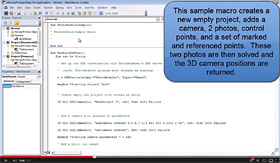 In the tip video we create a VBA application using Microsoft Word. The script is available in the PhotoModeler help file if you want to try it yourself.
The sample script creates a project, loads two photos, marks and references some points, processes to create 3D data, and then extracts some of that 3D data to show in simple message boxes in Word.
The programming interface of PhotoModeler has a number of uses:
- integrate photogrammetry into your workflow,
- extract data and create new measurement types,
- export 3d data in new specialized (and perhaps proprietary) file formats, and
- create points from a new marking algorithm and use PhotoModeler powerful processing algorithms to create 3D.
View the video below (or on Youtube) to learn more about PhotoModeler DDE programming.