
Tip 47: Extract stills from video for photogrammetry
 Can a video camera be used for photogrammetry (the science of extracting 3d measurements, models and scans from photos)? The answer now is ‘yes’. In the past there were two issues with using video cameras for photogrammetry:
- Photogrammetry packages work with still photographs, not moving video files.
- Video cameras had low resolution.
The latter issue has been answered with modern HD, 2K and 4K cameras with progressive frame capture. Progressive frame capture differs from interlace capture where every alternating line was captured, then on next half-frame the other lines. For moving subjects, interlace capture caused problematic artifacts. A 4K video camera is approximately equivalent to an 8 megapixel still camera in resolution.
A video camera can sometimes be a useful way to capture an object or scene from many angles – you walk around the object with the video camera and that captures hundreds or thousands of images.
These modern HD, 2K and 4K video cameras produce video files where most photogrammetry programs load only still image files (jpeg, tiff, bmp, png, etc.). PhotoModeler Premium can extract stills from a video file. The end result of this video extraction is a number of static image frames suited to photogrammetric processing.
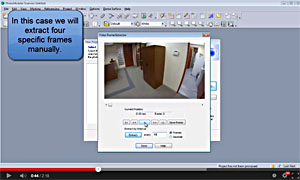 PhotoModeler Premium has a video importer that can handle .mov, .mp4, .avi, .wmv, .3gp, and .mpg files (note, whether a particular file can load depends sometimes on what codecs are installed). This screen shot from the tip video shows the dialog for choosing frames.
When a video file is chosen during project setup, still frames have to be extracted from the video. There are two methods of frame extraction in PhotoModeler:
- Automated frame extraction in SmartMatch projects.
- Manual frame extraction.
This tip video describes the manual frame extraction method. Watch the YouTube video below to find out more.