
Tip 32: Creating the New Plane type in PhotoModeler
 In the PhotoModeler Tip #32 video we demonstrate a feature new to the 2013.0 release (Feb 2013). The new feature is called: the 3D Plane. 3D Planes can be created on coordinate planes, or fit to three or more 3D points.
PhotoModeler has a number of surface types (single triangle, triangulated paths, lofts, sweeps, NURBS point fit, etc.), and now this new type – 3D Plane. A PhotoModeler Plane is a perfect mathematical plane (perfectly flat and infinite size). Planes are useful for certain modeling and measurement tasks.
A Plane can be created in two ways: a) on a coordinate system plane (xy, yz, xz plane), or b) fit to a user-selected set of 3D points (3 or more points). These fit points can come from normal 3d points, coded points, SmartPoints, and points on a selected DSM contour.
While the PhotoModeler Plane is a mathematical plane, to display it, the Plane has a visible extent. This extent is the same size as the Project’s extents (for the coordinate plane type), and the extents of the fitted points (for the point-fit type). These extents can be adjusted to make the visible plane smaller or bigger in the 3D View (and exports).
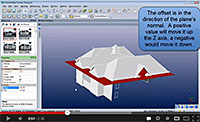 In addition a Plane can be shifted (offset) along its normal vector. This image shows a plane created on the xy plane (z=0) offset by a certain height to raise it above the ground plane.
Planes act like other surfaces in PhotoModeler and can be textured, exported, surface-drawn, projected, and measured.
The Plane is tied to the underlying objects that define it, so as they change the Plane will update. For example, a Plane based on the XY coordinate plane will update as the coordinate system changes (for example if you change the rotation axes). This keeps the Plane lined up at all times. As well, for a Plane fit to 3D Points, if one or more of those points change position, the Plane will update as well automatically.
An infinite plane is useful for certain photogrammetric measurement tasks (such as the height of an object above a plane that has been fit to some ground points, or a volume above a plane – such as in stock pile measurement).